A local business website has one main job: to persuade the person looking at it to get in touch. It is not a brochure, a portfolio for its own sake or a place to explain the company’s history at length. Someone has found you on Google Maps, been given your name by a friend or seen your van, and they want to know three things quickly. Do you do what I need, do you cover where I am, and can I trust you?
Many small business sites answer none of those questions clearly. The homepage says “Welcome to our website”, the phone number is an image that cannot be tapped, there are no prices, the services are crammed onto one page and the last update was several years ago. The business may be excellent, but the website gives no reason to pick it over the next one in the list.
This guide works through what a local business website needs, in the order a visitor experiences it. It uses examples from trades, clinics, salons, professional services and hospitality, covers the legal basics UK businesses often miss, explains schema in plain terms and looks at how AI assistants read your pages. There is a checklist table near the end you can use to audit your own site.
Key points
- Your homepage headline should say what you do and where, in plain words, within the first screen.
- Phone numbers must be tappable on mobile, and every page should offer an easy way to get in touch.
- Prices, starting prices or clear price guidance reduce wasted enquiries and build trust.
- Separate service and area pages help both visitors and search engines understand exactly what you offer.
- A privacy notice, a proper cookie consent banner where needed and, for limited companies, the required company details are legal basics, not extras.
- Clear, consistent, text-based information is what both Google and AI assistants rely on.
In this guide
- The first screen: say what you do and where
- Make getting in touch effortless
- Show prices, or at least guidance
- Service pages that answer real questions
- Area pages without copy and paste
- Proof: reviews, photos and accreditations
- Speed and mobile
- The legal basics
- Schema basics
- How your website supports Google Maps
- How AI assistants read your site
- Your website checklist
- Frequently asked questions
- Final thoughts
The first screen: say what you do and where
Most visitors decide within a few seconds whether they are in the right place. The top of your homepage, the part people see on a phone before scrolling, needs to answer the obvious questions.
A good headline is specific and plain. Compare these:
- “Quality you can trust” says nothing.
- “Electrician in Norwich for rewires, fuse boards and EV chargers” tells the visitor and Google exactly what you do and where.
- “Family dental practice in Harrogate, welcoming new private patients” answers the first question most patients have.
- “Independent hair salon in Clifton, Bristol, open late on Thursdays” gives a reason to choose you.
Under the headline, add one short line of supporting detail, such as the areas you cover or what makes you different, and a clear button: “Call now”, “Get a quote” or “Book online”. If you have strong reviews, a short line like “Rated by over 200 local customers on Google” can sit here too, as long as it is accurate and kept up to date.
Avoid large sliders, autoplay videos and stock photos of people shaking hands. They slow the page down and push the useful information out of sight.
Make getting in touch effortless
An enquiry is the whole point, so remove every bit of friction from it.
- Click-to-call. Your phone number should be written as text and set up so it can be tapped to call on a mobile. Put it in the header of every page.
- More than one option. Some people want to ring, others would rather fill in a form, send a WhatsApp message or book online. Offer the options you can reliably respond to.
- Short forms. Ask for name, contact details, postcode and a description of what they need. A form with twelve required fields loses people. Photo upload is useful for trades, where a picture of the problem helps you quote.
- Expectations. Say when you will reply, such as “We reply to all enquiries within one working day”, and keep to it.
- Opening hours and address. Show them clearly, and make sure they match your Google Business Profile. If you work from home and visit customers, show your service area rather than your home address.
Test your own contact routes every few months. Send yourself a form enquiry, call the number from a mobile and check the booking link still works. Broken forms are one of the most common and most costly website faults.
Show prices, or at least guidance
Many owners are reluctant to publish prices because every job is different. But visitors who cannot find any indication of cost often assume you are expensive, or ring a competitor who gives them a figure.
You do not need a full price list for everything. Options include:
- Fixed prices for standard services, such as a boiler service, an MOT, a dental check-up, a gent’s cut or a fixed-fee will.
- Starting prices with an explanation of what changes the cost, such as a “from” figure for bathroom refits, followed by a line explaining that size, tiling and the choice of fittings affect the final quote.
- Worked examples, such as “A typical three-bedroom semi rewire usually takes four to five days”.
- What is included, for example whether a quote includes materials, waste removal, VAT or aftercare.
If you do show prices to consumers, make sure they are honest and complete. Since April 2025, the Digital Markets, Competition and Consumers Act 2024 has required mandatory fees, such as compulsory booking or admin charges, to be included in the headline price rather than added at the end. A salon booking page that adds an unavoidable booking fee at checkout, or a holiday let that adds a compulsory cleaning fee late in the process, risks breaching these rules.
Tip
Keep prices identical everywhere. If your website, Google profile, booking system and social media show different prices for the same service, customers lose trust and AI tools may repeat the wrong figure.
Service pages that answer real questions
A single “Services” page listing everything you do is rarely enough. Give each main service its own page. A heating engineer might have separate pages for boiler installation, boiler servicing, boiler repairs, heat pumps and landlord gas safety certificates. A physiotherapy clinic might have pages for sports injuries, back pain, post-operative rehabilitation and sports massage.
Each service page should cover:
- What the service is, in plain language.
- Who it is for and when someone typically needs it.
- What happens, step by step, from enquiry to finish.
- Price or price guidance.
- How long it takes.
- Any relevant qualifications, registrations or guarantees.
- Photos or examples of real work, where appropriate.
- Common questions, answered briefly.
- A clear call to action.
Write the way customers speak. People search for “emergency plumber”, “nail extensions” or “help with a tax return”, not “comprehensive fiscal compliance solutions”. A useful test is whether the page would help a customer who rang you and asked “What does that involve?”
Area pages without copy and paste
If you serve several towns or neighbourhoods, a page for each main area can help people in those places find you. The problem is that many businesses produce dozens of near-identical pages with only the town name changed. These are of little use to visitors, and Google treats mass-produced, low-value pages as spam.
A worthwhile area page includes something specific to that place:
- Typical jobs or customers there, such as older terraced housing, new-build estates or busy commuter households.
- Recent work in the area, with photos and the customer’s permission.
- Practical details like parking, travel time, or which days you usually cover it.
- Reviews from customers in that area.
Start with the four or five areas that matter most to your business and do them well. A restaurant or clinic with one location usually needs a good location page with directions, parking and public transport information more than a set of area pages.
Proof: reviews, photos and accreditations
Visitors want evidence that you are real, competent and reliable. Proof works best when it is specific and verifiable.
- Reviews. Show a selection of genuine reviews, ideally with a link to your Google profile so visitors can read them all. If you publish reviews on your own site, you are responsible for not presenting them misleadingly, for example by showing only the positive ones as if they were representative.
- Photos. Real photos of your work, premises and team are far more convincing than stock images. A before-and-after gallery suits trades, groomers and decorators. Clinics and salons benefit from photos of the treatment rooms and reception.
- Accreditations. Show registrations and memberships that are relevant and current, such as Gas Safe, NICEIC, TrustMark, a professional body or a regulator. Link to your entry on the scheme’s own register where one exists, so visitors can check.
- People. An about page with real names, photos and a few lines on experience builds trust, particularly for clinics and professional services where customers want to know who they will see.
- Guarantees and insurance. State what you guarantee and for how long, and mention your insurance where it is relevant to the customer.
Never display a logo for a scheme you are not a current member of, and never invent reviews or testimonials. Both can mislead customers and may break consumer protection law.
Speed and mobile
Most local searches happen on a phone, often while the person is out or in a hurry. A site that is slow or awkward on mobile loses enquiries before the visitor has read anything.
Practical checks:
- Open your site on your own phone using mobile data, not office Wi-Fi. If it takes more than a few seconds to show anything useful, it needs work.
- Make sure text is readable without zooming and buttons are large enough to tap.
- Compress images before uploading them. Large, unoptimised photos are the most common cause of slow small business sites.
- Remove plugins, pop-ups and scripts you no longer use.
- Use Google’s free PageSpeed Insights tool to check your Core Web Vitals, which measure loading, responsiveness and visual stability.
Avoid pop-ups that cover the page as soon as it loads on mobile. They frustrate visitors who simply want your phone number.
The legal basics
These are easy to overlook, but they apply to most UK business websites. If you are unsure about any of them, take advice.
Privacy notice
If your website collects personal data, for example through an enquiry form, booking system or newsletter sign-up, you need a privacy notice under UK GDPR. It should explain in plain language who you are, what data you collect, why, your lawful basis, who you share it with, how long you keep it and people’s rights. Link to it from every page, usually in the footer, and from your forms. Most businesses that process personal data also need to pay the data protection fee to the Information Commissioner’s Office.
Cookie consent
Under the Privacy and Electronic Communications Regulations (PECR), you generally need consent before setting non-essential cookies, such as those used for advertising and many analytics tools. Strictly necessary cookies, such as those that keep a booking basket working, do not need consent. A compliant banner gives visitors a genuine choice, does not set non-essential cookies before they agree and makes refusing as easy as accepting. Since February 2026, changes made by the Data (Use and Access) Act 2025 have allowed some low-risk cookies, such as certain analytics cookies, to be set without consent, provided you give visitors clear information and a simple way to object. The conditions are detailed, so check the ICO’s current guidance before changing your setup.
Company details for limited companies
If you trade as a limited company, the trading disclosure rules require your website to show your company’s registered name, registered number, the part of the UK where it is registered (for example England and Wales) and your registered office address. These details usually sit in the footer or on the contact page. The same information is also required on business letters, order forms and emails in various forms. Limited liability partnerships have equivalent requirements. Sole traders and partnerships trading under a name other than their own must show the owner’s or each partner’s name and an address where documents can be served, including on their website. Companies House and Trading Standards guidance sets out the requirements in full.
Information for online services
More generally, if you offer services or take bookings online, consumers should be able to find your business name, a geographic address and contact details including an email address. If you are VAT registered, the Electronic Commerce Regulations also require your VAT number to be shown, and limited companies must show their registered number. Clear terms and conditions, and information about cancellation rights where you sell to consumers at a distance, are also worth having in place.
Tip
Check your footer. Many sites can meet the company detail and privacy requirements simply by adding a few lines and links to the footer of every page.
Schema basics
Schema markup is a small piece of code added to your pages that labels your key details in a format search engines can read reliably: your business name, type, address, phone number, opening hours and services. Visitors do not see it.
For a local business, the most useful type is LocalBusiness, or a more specific type such as Dentist, Electrician or Restaurant where one fits. Most of the value comes from getting the basic details right and making sure they match what is visible on the page and on your Google Business Profile.
A few points to know:
- Schema should describe what is actually on the page. Marking up information visitors cannot see, or reviews you have written yourself, is against Google’s guidelines.
- Google stopped showing FAQ rich results from 7 May 2026, but writing helpful FAQs on your pages is still worthwhile for visitors and other search tools.
- Use Google’s Rich Results Test or the Schema Markup Validator to check the markup is working after any website change.
Schema is not a ranking shortcut, but it removes ambiguity about who you are and where you are, which helps search engines and AI tools match your website to your business.
How your website supports Google Maps
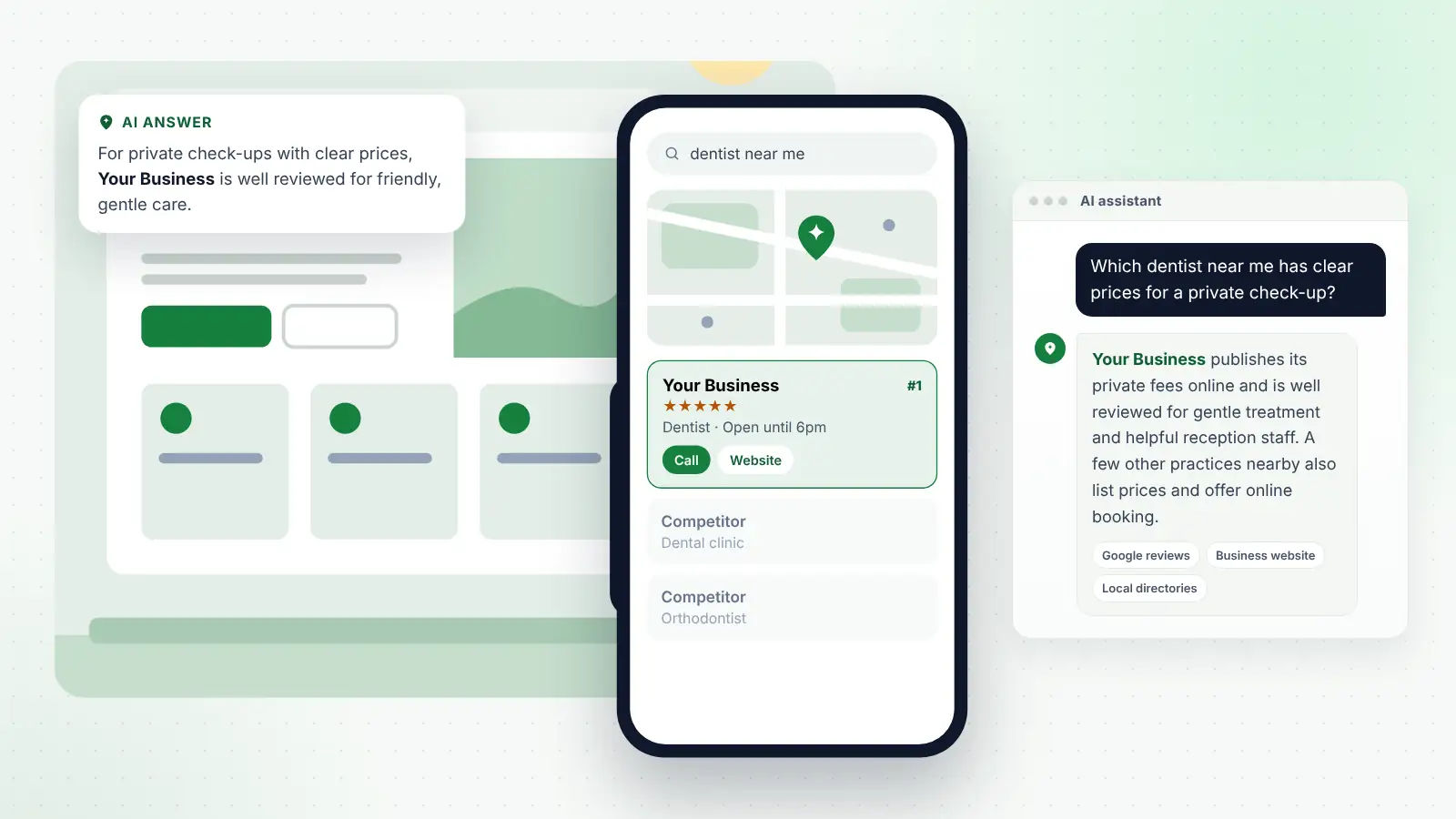
Your website and your Google Business Profile work together. When someone searches “dentist near me” or “emergency locksmith Swindon”, Google decides which businesses to show in the map results partly on relevance and prominence, and your website is one of the main ways it judges both.
Link your Google Business Profile to the most relevant page on your site, usually the homepage for a single-location business or the location page for a branch. Make sure the name, address, phone number and opening hours on that page match the profile exactly. Use service pages that match the services listed on your profile, and an area page or location page that makes clear where you work.
Visitors also move between the two. Many people look at your profile, tap through to the website to check prices and photos, then call. If the website contradicts the profile, for example with different hours, a different phone number or services you no longer offer, you lose them at the final step. If you would rather have specialists keep your profile, website and listings aligned, there are local SEO and AI search services for small businesses that handle this on a monthly basis.
How AI assistants read your site
People increasingly ask AI assistants such as ChatGPT, Gemini, Perplexity and Copilot, or read Google’s AI Overviews, before choosing a local business. They ask things like “Which plumber in Derby does boiler servicing on Saturdays?” or “Is there a vegan-friendly café near Leeds station?”
Their recommendations rest on details they can locate and believe. Your website is one of the main sources, alongside your Google profile, reviews, directories and mentions on other sites. Some tools search the web live through search engines such as Google or Bing, so the basics of being crawlable still apply.
What helps an AI assistant use your site accurately:
- Plain text, not images. Prices, opening hours, phone numbers and service lists should be written as text on the page. Information that exists only in a PDF, a graphic or an Instagram post is much harder for any system to read.
- Specific, factual statements. “We service most major boiler brands across Derby and South Derbyshire, including Saturdays” is far more useful than “We offer a wide range of heating solutions”.
- Questions answered directly. Short FAQ sections that answer what customers actually ask, such as prices, timings, parking or whether you take new patients, give assistants something clear to quote.
- Consistency. If your website says you open at 9am and your Google profile says 8am, an assistant may repeat either one, or neither.
- Access. Check your website is not accidentally blocking search engines. If you or your web developer change settings that control which crawlers can access your site, understand what each setting does before blocking anything.
There is no way to guarantee an AI assistant will recommend you, but a website that states clearly what you do, where, for whom and at what price gives these tools accurate material to work with.
Your website checklist
Use this table to audit your site, or to brief a web designer. Most items take minutes to check and are inexpensive to fix.
| Area | What to check | Why it matters |
|---|---|---|
| Headline | Says what you do and where in the first screen | Visitors decide in seconds whether to stay |
| Phone number | Text, tappable on mobile, in the header of every page | Calls are the main enquiry route for many firms |
| Contact options | Short form, phone, and booking or messaging if you use them | Different customers prefer different routes |
| Response time | States when you reply, and you keep to it | Sets expectations and reduces chasers |
| Prices | Fixed, starting or guide prices, with mandatory fees included | Builds trust and filters out poor-fit enquiries |
| Service pages | One page per main service, with process, price and FAQs | Matches what people search for |
| Area pages | Genuine, distinct pages for key areas only | Helps local visibility without thin content |
| Reviews | Genuine selection with a link to your Google profile | Social proof from real customers |
| Photos | Real work, premises and team | More convincing than stock images |
| Accreditations | Current memberships, linked to official registers | Lets visitors verify your claims |
| Mobile and speed | Loads quickly on mobile data, readable without zooming | Most local searches are on phones |
| Privacy notice | Linked from footer and forms | Required where you collect personal data |
| Cookie banner | Real choice, no non-essential cookies before consent | Required under PECR for non-essential cookies |
| Company details | Registered name, number, place of registration, registered office | Required for limited companies |
| Schema | LocalBusiness or specific type, tested and accurate | Helps search engines read your details |
| Consistency | Name, address, phone and hours match your Google profile | Supports Google Maps and AI answers |
Frequently asked questions
Do I need a website if I already have a Google Business Profile?
You can win work with a profile alone, but a website gives you space to explain your services, show prices and proof, and answer questions that a profile cannot. It also gives Google and AI tools more information to understand and trust your business.
How many pages does a local business website need?
Enough to cover your main services and locations properly. For many small businesses that means a homepage, a page for each main service, a page for each key area or location, an about page, a contact page and the legal pages. Quality matters more than quantity.
Should I put prices on my website if every job is different?
Starting prices or price guidance are usually better than nothing. Explain what affects the cost and give typical examples. Customers who understand roughly what to expect are more likely to enquire, and less likely to waste your time if your service is outside their budget.
Is a cookie banner always needed?
You generally need consent for non-essential cookies, such as advertising and many analytics cookies. If your site only uses strictly necessary cookies, you may not need a consent banner, but you should still explain the cookies you use. Check the ICO’s current guidance, as the rules changed in 2026 and some low-risk cookies no longer need consent.
Can I build the website myself?
Yes, many owners do, using website builders. The checklist in this guide applies whatever platform you use. The things most often missed are tappable phone numbers, service pages, the legal basics and testing contact forms regularly.
Final thoughts
A good local business website is not about clever design. It is about answering the visitor’s questions quickly and honestly: what you do, where, roughly how much, why they should trust you and how to get in touch. Add the legal basics, keep it fast on mobile and make sure your details match everywhere they appear.
Work through the checklist above, fix the quickest items first, then improve your service and area pages over the following months. Each improvement helps the people visiting your site today, and gives Google and AI assistants clearer information to work with tomorrow.