Most local businesses get reviews in waves. The owner reads an article, asks a few customers, gets a handful of reviews, then a busy month arrives and the asking stops. Six months later the newest review is out of date and the cycle starts again. The problem is rarely a shortage of happy customers. It is that asking depends on someone remembering, on a good day, at the right moment.
A review generation system takes memory out of it. Every customer is asked, in the same fair way, at a sensible moment, through a channel that suits them, with one polite reminder and no pressure. The process is written down, partly automated, owned by a named person and checked once a month. It works the same whether the business is quiet or flat out.
This guide sets out how to build that system: finding the right moment for your type of business, deciding who asks, choosing channels, setting up your review link, automating through your booking or job software, training and recognising staff fairly, tracking results and staying within Google’s rules and UK law. It finishes with a 30-day rollout plan. For the basics of why reviews matter and how to reply to them, see our guides on why online reviews matter and on responding to negative reviews.
Key points
- A system means every customer is asked, the same way, at a planned moment, with one reminder and no pressure.
- The best time to ask is the “moment of delight”, which differs by business type, and the request should come from the person the customer dealt with.
- Use Google’s own review link and QR code, sent by text, email or WhatsApp, and printed on cards and receipts.
- Since April 2026, Google’s policies prohibit asking staff to collect a set number of reviews or reviews that name a staff member, so never set review quotas or link pay to review counts.
- Never offer customers incentives, never filter out unhappy customers, and remember that fake and concealed incentivised reviews are banned under UK law.
- Track requests sent, reviews received, replies and themes on a simple monthly dashboard.
In this guide
- Find your moment of delight
- Decide who asks
- Choose your channels
- Set up short links to the Google review form
- Automate it through your CRM or booking system
- Train staff and recognise them fairly
- Track it on a monthly review dashboard
- Stay within the law and Google’s policies
- How the system helps you on Google Maps
- How the system feeds AI assistants
- A 30-day rollout plan
- Frequently asked questions
- Next steps
Find your moment of delight
The moment of delight is the point at which the customer has just experienced the result they wanted and feels most positive about it. Ask before it and they have nothing to say. Ask long after and the feeling has faded. It differs by business, and sometimes by service within the same business.
Trades and home services
For an emergency locksmith or plumber, it is the minute the door opens or the leak stops, often late at night when the customer is relieved and grateful. A short request in person, followed by a text the next morning, works better than a text at 2am. For project work such as a new kitchen or roof, the moment is usually not the last day on site, when there is dust and snagging, but a few days later, once any snagging is sorted and the customer has cooked their first meal or seen the first heavy rain stay outside. Leave it much longer than that and the request starts to feel like an afterthought.
Garages
For an MOT and service, it is when the customer collects the car and the technician explains what was checked, what passed and what to watch. The explanation is what customers tend to remember and write about.
Salons, barbers and beauty
For a hair or beauty appointment, it is when the client sees the result in the mirror. For treatments where results develop over time, such as some skin treatments, it may be the follow-up visit.
Clinics
For a physiotherapist or osteopath, the moment is often when a patient reports real progress, such as running again or sleeping through the night, or at discharge. For a dental practice, it might be after a nervous patient’s first comfortable check-up, or when a cosmetic treatment is finished.
Professional services
For an accountant, it is when the return is filed or a clear piece of advice saves the client time or worry. For a solicitor, it is usually after completion of a house purchase or a matter has concluded, not midway through.
Hospitality
For a restaurant or pub, it is as the guest is leaving after a good meal, particularly a celebration. For a hotel or B&B, it is at checkout or the day after departure, before the guest is back in their routine.
Write your moment down in one sentence for each main service. That sentence becomes the trigger for everything else in the system.
Decide who asks
The most effective request comes from the person the customer actually dealt with, because the relationship is already there. A technician who explained the MOT, the stylist who did the colour, the engineer who fixed the boiler and the accountant who filed the return are all better placed than an anonymous email from “the team”.
That does not mean everyone needs to do everything. A clear split works well:
- The person who delivered the service makes a brief, friendly request in person, and mentions that a link will follow.
- The system sends the link by text, email or WhatsApp, with one reminder.
- One named person owns the process: checks it is running, replies to reviews, keeps the dashboard and fixes problems such as a broken link or a missing mobile number.
In a one-person business, that is all you. In a practice or salon with several staff, the owner is often the wrong person to own the day-to-day process, because they are the busiest. A practice manager, receptionist or office administrator is usually a better fit, with the owner checking the dashboard monthly.
Choose your channels
Most customers will not leave a review just because you asked in person. They need a link in their hand at a time when they have a minute. Use more than one channel, but keep each one simple.
In person
A short spoken request sets up everything else. Something like “I’m glad that’s sorted. We’ll send you a quick text with a link in case you have a moment to leave a Google review. It really helps us.” It should be the same request for every customer, regardless of how you think they feel.
Text messages
Texts are read quickly and suit trades, garages, salons and clinics. Keep them to two or three lines: the customer’s first name, what you did, a sentence of thanks and the link. Send from a recognisable business name, not a random number.
Email suits professional services, hotels and anything with a longer relationship, and it gives you room for a little more warmth. Keep the review link high up and clearly labelled. A one-line request in your standard job-completion or thank-you email can work as well as a separate message.
If your customers already message you on WhatsApp, as many do with trades, groomers and small salons, sending the link in the same conversation feels natural. Google’s own help pages mention WhatsApp as a way to share your review link.
QR cards, displays and receipts
Printed QR codes work best where the transaction happens: a card handed over with the car keys, a small sign at the salon desk, a table card or receipt in a café, a leave-behind card left on the kitchen worktop. Google is clear that you should not require or pressure customers to leave a review while they are on your premises, so a QR code they can use later is fine, but asking them to complete a review on a tablet at the till is not.
A simple follow-up sequence
Busy people often mean to leave a review and forget, so one polite reminder is reasonable. More than one starts to feel like nagging. A sensible sequence is:
- A brief request in person at the moment of delight.
- The link by text, email or WhatsApp the same day or the next morning.
- One reminder three to five days later, only if no review has appeared.
- Then stop, and do not chase again for that visit.
The reminder can be one line: “Just a quick follow-up in case the link got buried. No worries at all if you’re busy.” Never suggest that something depends on a review, and do not send reminders to people who have said no.
Tip
Keep review requests free of offers and promotions. A plain message about the job you just did is the safest approach. Add a discount code or a sales pitch and it is likely to be treated as marketing under PECR, which brings consent rules into play and blurs the line with incentives.
Set up short links to the Google review form
The biggest barrier to a review is effort. Your link should open the review form directly, so the customer does not have to search for you.
Google’s help article on creating a Google link or QR code to request reviews explains the current route: open your Business Profile, choose to read reviews, then select the option to get more reviews. From there you can copy the link and save the QR code. At the time of writing, Google says review QR codes can only be generated from a computer browser, not on a mobile device.
A few practical points:
- Test the link on both an iPhone and an Android phone, signed in and signed out of Google. Customers need to be signed in to a Google Account to post, so it is worth knowing what they will see.
- Consider a simple redirect on your own domain, such as yourwebsite.co.uk/review, that points to the Google link. It is easier to say out loud, print and update if Google changes the link format.
- Use one link everywhere and keep a note of where it appears: text templates, email signature, invoice template, receipts, QR cards and signs.
- Print QR codes large enough to scan easily, with a few words beside them such as “Scan to review us on Google”, and check them under the lighting where they will be used.
If you have more than one branch, each location needs its own link and QR code, so reviews land on the right profile.
Automate it through your CRM or booking system
Once you know your moment and your message, let software do the remembering. Many booking, job management, practice management and till systems can send an automatic text or email when something happens. Check what yours offers before paying for a separate review tool.
Useful triggers include:
- A job marked complete in a trades or field service system.
- An appointment checked out in a salon or clinic booking system.
- An invoice paid for professional services.
- A checkout in hotel or B&B software.
- A vehicle marked ready for collection in garage management software.
Then set the rules carefully:
- Delay. Choose a delay that matches your moment of delight, such as two hours after a salon appointment, the next morning after an emergency call-out or a few days after a project handover.
- Frequency. Ask regular customers occasionally rather than after every visit. Once every few months is plenty for a weekly café regular or a monthly grooming client.
- Practical exclusions only. It is reasonable to skip customers with no valid contact details or who have opted out of messages. Do not build filters based on satisfaction scores, survey answers or staff guesses about how someone feels, because selectively soliciting positive reviews is against Google’s policies.
- One reminder. If your system supports it, add one reminder after a few days and cancel it if the customer leaves a review.
- Recording. Log that a request was sent, so you can measure your response rate.
Some software offers a feedback survey before showing the Google link, sending happy customers to Google and unhappy ones to a private form. That is review gating, and it breaks Google’s rules. If you want private feedback, ask for it separately and still give every customer the same review link.
Train staff and recognise them fairly
Staff are the face of the system. They need a short script, a clear understanding of what is not allowed and a reason to care that does not create the wrong incentives.
What to train
Fifteen minutes in a team meeting is usually enough. Cover:
- The moment for each service and the exact request to use.
- What to say if a customer asks how, such as “We’ll text you the link” or pointing to the QR card.
- What not to say. No “please give us five stars”, no “please mention my name”, no suggesting what to write, no asking only the customers who seem happy and no hovering while someone writes a review.
- What to do if a customer is unhappy. Listen, fix the problem or pass it to the manager, and do not argue. The customer still gets the same review link as everyone else.
Role-play the request a couple of times. It feels awkward for about a day and then becomes routine.
Google’s 2026 rules on staff
In April 2026, Google added two points to the rating manipulation section of its Maps user contributed content policy. Merchants should not request that staff solicit a certain number of reviews, and should not request that staff solicit reviews that include specific content, including content that identifies a staff member. This sits alongside Google’s existing rules against offering incentives for reviews and against asking for specific content.
In practical terms, that means:
- Do not set staff targets such as “ten reviews each this month”.
- Do not run leaderboards ranking staff by the number of reviews or mentions they collect.
- Do not ask staff to encourage customers to mention them by name.
- If a customer mentions a staff member of their own accord, that is fine. It is asking for it that is the problem.
Fair ways to recognise staff
Google has not published detailed guidance on staff rewards, so take the cautious route. Avoid any bonus, prize or commission tied to the number of reviews, the star rating or name mentions. Recognition is safer when it rewards the service itself: thanking the team when customers praise something, sharing good feedback in team meetings, and including customer care in normal appraisals. Make asking every customer a standard part of the job, like issuing a receipt, rather than a competition.
Tip
Share reviews with the team every week, good and bad. Staff who see what customers notice tend to deliver more of it, which produces better reviews without any targets at all.
Track it on a monthly review dashboard
A system without numbers drifts. A simple spreadsheet, updated once a month by the person who owns the process, is enough. Your Business Profile, booking or job system and any review platforms you use will provide most of the figures.
| Measure | Where to find it | What it tells you |
|---|---|---|
| Requests sent | Booking, CRM or job system log | Whether the process is actually running |
| New Google reviews | Business Profile | Overall output for the month |
| Response rate | New reviews divided by requests sent | Whether timing, channel and wording work |
| Average rating, last 90 days | Business Profile | Current quality, not the lifetime average |
| Days since newest review | Business Profile | Recency, as customers see it |
| Replies within a week | Business Profile | Whether reviews are being looked after |
| Services and themes mentioned | Reading the month’s reviews | What customers value and what needs fixing |
| Calls, website clicks, directions | Business Profile performance | Whether reviews support enquiries over time |
Look at trends over three months rather than reacting to one week. If requests are high but reviews are low, look at timing, the wording or the link. If requests drop, the process has slipped, often because a staff member has left or a template has broken. If a theme such as waiting times appears repeatedly, treat it as an operational problem to fix rather than a review problem.
Stay within the law and Google’s policies
A review system makes asking routine, which is exactly why it must be built fairly from the start. A flaw in an automated process repeats itself with every customer.
Google’s rules
Google’s policies prohibit offering incentives such as payment, discounts or free goods or services in exchange for reviews, discouraging negative reviews, selectively soliciting positive reviews, asking for specific content and pressuring customers to review while on your premises, as well as the staff rules described above. Breaches can lead to reviews being removed and, in the UK, to restrictions or warnings on your profile.
UK consumer law
Under the Digital Markets, Competition and Consumers Act 2024, from 6 April 2025 submitting or commissioning fake reviews, and concealing that a review was incentivised, have been treated as banned practices in all circumstances. Publishing reviews in a misleading way, such as hiding negative ones on your own website, is also prohibited. The Competition and Markets Authority can enforce consumer law directly and impose significant fines, and the rules apply to businesses of every size. The CMA’s guidance on fake reviews sets out what businesses are expected to do.
UK law permits some incentivised reviews if they are clearly disclosed, but Google does not allow incentives at all. Because Google is usually your main review platform, the simple rule is never to offer customers anything in return for a review.
Messaging rules
Keep review requests to customers you have actually served, sent in connection with that service. If your messages also promote offers, they are likely to count as marketing under the Privacy and Electronic Communications Regulations, which require consent or the soft opt-in and an easy way to opt out. If you are unsure, check the Information Commissioner’s Office guidance on electronic marketing.
Regulated professions
Clinics, solicitors, financial advisers and other regulated businesses should check their regulator’s rules on using reviews and on confidentiality before automating requests, particularly where a message might reveal that someone is a patient or client.
How the system helps you on Google Maps
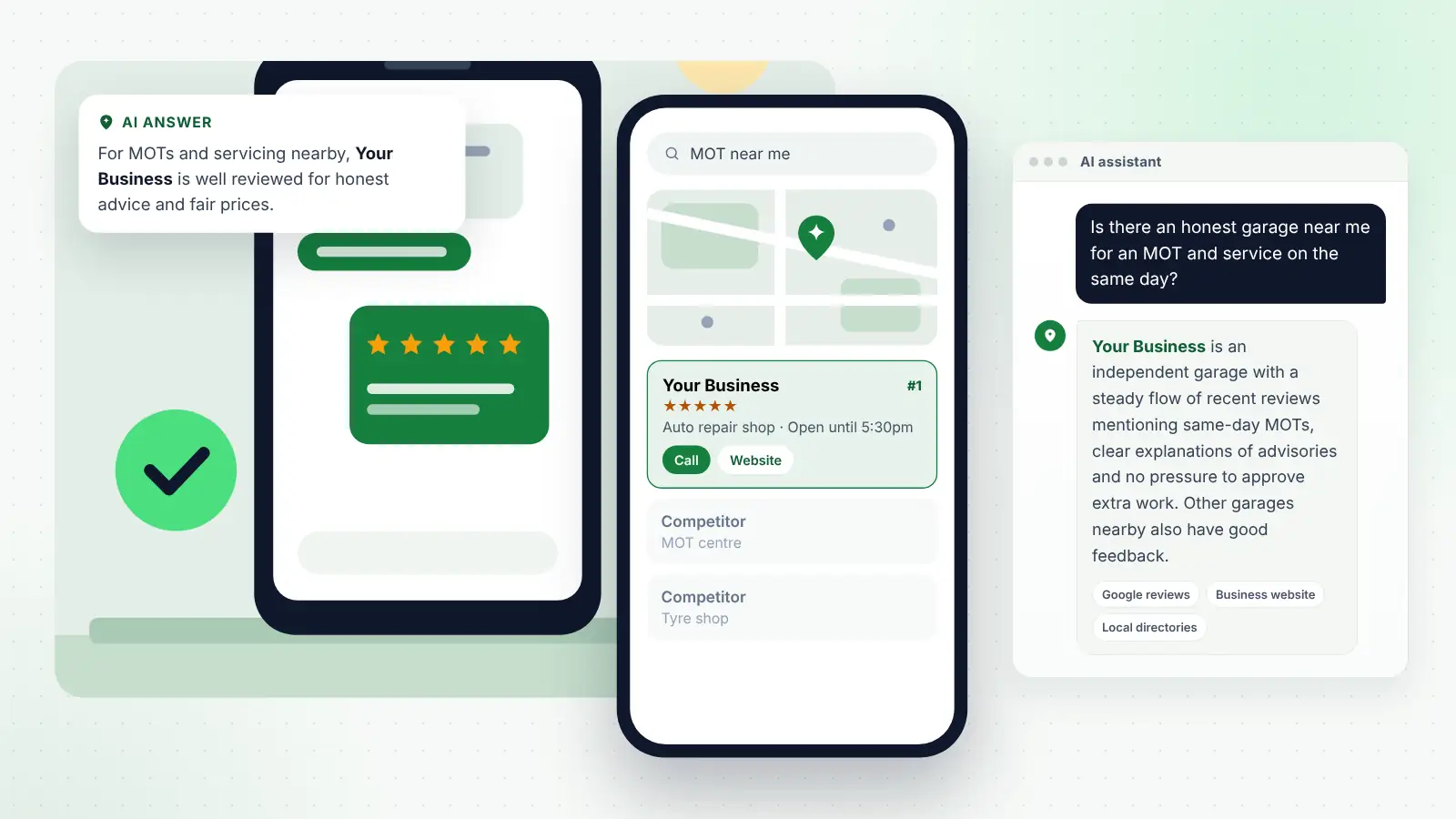
The real benefit of a system is consistency, and consistency is what shows on Google Maps. Google’s guidance on local ranking says prominence is one of its main factors, and that more reviews and positive ratings can help a business’s local ranking. A steady weekly flow keeps your profile recent, which is what customers comparing businesses in the map pack notice first.
A system also improves the mix of reviews. When every customer is asked, not just the ones who happen to be chatty, reviews start to cover all your services. A garage that only remembered to ask after big repairs will start getting reviews that mention MOTs, tyres and air conditioning. A salon will get reviews for colour, cuts and treatments rather than just one stylist’s regulars. That variety helps people searching for particular services recognise that you offer them.
Reviews are one part of Maps visibility, alongside a complete and accurate Business Profile, consistent details across directories and a website with clear service pages. If you would like help connecting your review system to the rest of that work, our local SEO and AI search services for small businesses cover the profile, website and listings side so each part supports the others.
How the system feeds AI assistants
People increasingly ask AI assistants such as ChatGPT, Gemini, Perplexity and Copilot for local recommendations in full sentences: “Is there an honest garage near me for an MOT and service on the same day?” or “Which physio near me is good with running injuries?” These tools draw on reviews, Business Profiles, directories and websites, and tend to summarise recurring themes rather than individual comments.
A review system helps here in three ways. Volume and recency give AI tools more current information to work with. A wider spread of customers produces reviews that mention more services and situations, so there is more to match against detailed questions. And because you are reading every review on your monthly dashboard, you spot recurring complaints early and can fix them before they become the theme an assistant repeats.
Support that with a website that clearly describes your services, prices or pricing approach where you can, and answers common questions in plain language, so AI tools find the same picture wherever they look. Nobody can guarantee what an assistant will say, but a business with steady, genuine, detailed reviews and consistent information is far better placed than one that asks in occasional bursts.
A 30-day rollout plan
You do not need to build everything at once. This plan gets a basic system running within a month, with automation and tracking added once the basics work.
| Days | Task | Owner | Done when |
|---|---|---|---|
| 1–2 | Write your moment of delight for each main service | Owner | One sentence per service agreed |
| 1–2 | Name the person who owns the system | Owner | Name and monthly check date agreed |
| 3–4 | Create the Google review link and QR code, plus a redirect on your website | System owner | Link tested on iPhone and Android |
| 3–5 | Record your starting figures: review count, rating, newest review date, competitors | System owner | Baseline saved in the dashboard |
| 5–7 | Write the in-person request, text, email and reminder wording | Owner and system owner | Templates saved, no offers or scripted content |
| 8–10 | Order QR cards, desk signs and add the link to receipts and invoices | System owner | Printed items in place where customers pay or collect |
| 8–10 | Train staff in a 15-minute session, including what is not allowed | Owner | Every staff member has practised the request |
| 11–14 | Start asking every customer manually, sending the link the same day | Whole team | Requests logged for every completed job or visit |
| 15–18 | Set up automatic requests and one reminder in your booking or job system | System owner | Test message received by a member of staff |
| 15–18 | Remove any survey or filter that sends only happy customers to Google | System owner | Every customer receives the same link |
| 19–21 | Check the first week of automation: delivery, timing, broken links | System owner | Issues fixed |
| 22–25 | Reply to every new review and share the best feedback with the team | System owner | All reviews from the month replied to |
| 26–28 | Review results against your baseline and adjust timing or wording | Owner and system owner | One change agreed, if needed |
| 29–30 | Fix the monthly dashboard date in the diary for the next twelve months | Owner | Recurring check booked |
After the first month, the system should need around an hour a month to check and a few minutes a day to reply to reviews.
Frequently asked questions
How soon should I send the review link?
Match it to the moment of delight. For appointments such as hair, beauty or garage visits, the same day works well. For emergency call-outs, the next morning is usually better than the middle of the night. For larger projects, a few days after completion, once any snagging is sorted, gives the customer time to enjoy the result while it is still fresh.
Is it acceptable to send customers a reminder?
Yes, one polite reminder is reasonable and often helps. Send it a few days after the first request, only if no review has appeared, and then stop. Never suggest that anything depends on the customer leaving a review.
Can I reward staff for getting reviews?
Avoid it. Since April 2026, Google’s policies say merchants should not request that staff solicit a certain number of reviews or reviews that identify a staff member. The safest approach is to make asking a normal part of everyone’s job and to recognise good customer service generally, rather than linking rewards to review numbers, ratings or name mentions.
Can I use a survey to check whether customers are happy first?
You can ask for private feedback, but you must not use it to decide who receives the Google link. Selectively soliciting positive reviews is against Google’s policies. Give every customer the same review request, whatever their survey answer.
Do I need special software for this?
Usually not. Many booking, job management and practice systems can send automatic messages after a job or appointment. Start with what you have, plus Google’s free review link and QR code, and only look at dedicated tools if you outgrow them. Check any tool you consider does not include gating features.
What if a customer says they do not use Google?
Thank them and leave it there. If you also use one other platform your customers prefer, such as Tripadvisor or a trade directory, you can mention it, but do not push. A customer who declines should not receive reminders.
Next steps
Start small. Write down your moment of delight, create and test your review link, and ask every customer for the next two weeks. Then add automation, a single reminder and a monthly dashboard. Keep the rules simple: ask everyone, offer nothing in return, never filter, never pressure and never set staff quotas. A system like this rarely produces a sudden jump, but within a few months most businesses find their reviews are recent, varied and steady, which is what customers, Google and AI assistants all look for.