Most business owners agree that they should ask for reviews. Where they get stuck is the wording. What do you actually say to a customer at the door, at the till or at the end of a consultation without sounding awkward, pushy or desperate? What should the text message say, and how is an email to a solicitor’s client different from one to a café regular? Without ready-made words, the request is put off until later, and later rarely comes.
This guide is a toolkit of scripts and templates you can adapt and use straight away: what to say in person, and what to send by text, email and WhatsApp, plus wording for printed cards, receipts, invoices and a single polite follow-up. Each is adjusted for different kinds of business, from an electrician or a dental practice to a salon, an accountancy firm, a restaurant and a business-to-business supplier.
It deliberately does not repeat the general case for reviews or how to reply to them, which are covered in our guides on getting more Google reviews and responding to negative ones. The focus here is the words themselves, and the phrases that can get your reviews removed or your business into trouble.
Key points
- A good review request is short, personal, mentions what you did for the customer and includes a direct link.
- Ask every customer in the same way; asking only the happy ones or offering anything in return breaks Google’s rules, and asking for five stars is the kind of steering its policy warns against.
- Google’s current policy also says businesses should not request specific content, so never hand customers keywords, town names or staff names to include.
- Clinics, solicitors and accountants need neutral wording that reveals nothing about the customer’s care or matter, even in a text message.
- Send one reminder at most, and keep review requests free of offers so they stay a simple feedback message.
In this guide
- The rules every template has to follow
- The four building blocks of a good request
- What to say in person
- Text message and WhatsApp templates
- Email templates
- Printed cards, receipts and invoices
- Follow-ups: one reminder, then stop
- Adapting the scripts for your sector
- Getting useful detail without scripting the review
- Which template to use when
- How better requests show up on Google Maps
- Review requests and AI assistants
- Frequently asked questions
- Final thoughts
The rules every template has to follow
Before the scripts, a short set of rules. Every template in this guide has been written to stay inside them, and if you adapt the wording you should check your version against the same list.
Google’s prohibited content policy for Maps says businesses must not offer incentives for reviews, must not discourage negative reviews or selectively ask for positive ones, and should not pressure customers to leave a review while they are on the premises. Since an update in 2026 it also says businesses should not request that specific content be included, and gives two examples: setting staff targets for a number of reviews, and asking staff to collect reviews with particular content, including content naming a member of staff. What Google does allow is asking customers to share a genuine experience, without incentives and without trying to influence the rating or what they write. You can read the current wording in Google’s prohibited and restricted content policy.
In practice, that means every request should:
- Go to every customer, or every customer in a defined group such as all completed jobs that week, not just the ones you expect to be pleased.
- Ask for honest feedback, not a particular star rating.
- Offer nothing in return: no discount, prize draw, free product or donation.
- Leave the content of the review entirely to the customer.
- Give the customer time and space, rather than a tablet pushed across the counter.
UK consumer law adds weight to this. Since April 2025, fake reviews and reviews that conceal an incentive have been banned practices under the Digital Markets, Competition and Consumers Act 2024, enforced by the Competition and Markets Authority.
Is a review request a marketing message?
This matters if you send requests by text or email. The Information Commissioner’s Office says genuine market research and non-promotional customer service messages are not direct marketing, but that a message can become direct marketing if it includes promotional content, even when that is not its main purpose. Its guidance on identifying direct marketing explains the distinction. The safest approach is to keep review requests plain: thank the customer, ask for feedback, give the link, and leave out offers, new services and “book again” promotions. If you want to send marketing as well, send it separately and only to people who have agreed to receive it.
The four building blocks of a good request
Every effective template, whatever the channel, is built from the same four parts.
- A personal thank-you. Use the customer’s first name and say what you did: “the new consumer unit”, “your colour appointment”, “the sale of your flat”.
- A reason that is about other people. “Reviews help other people nearby decide who to use” works better than “Reviews really help our business.”
- A direct link. Use the review link or QR code from your Google Business Profile, so the customer lands on the review form, not a search page.
- An easy way out. “No worries if you’re busy” or “only if you have a moment” makes the request feel like an invitation, not a demand.
Personalising without overdoing it
Personalisation is what separates a request people act on from one they ignore. Mention the specific job or visit, the day it happened, and sign off with a real name. Keep the details to what the customer would expect you to know and would be comfortable seeing on a lock screen: “Thanks for having us round on Tuesday to sort the outside lights” is fine; anything about a health condition, a legal dispute or a payment problem is not. If a team member did the work, it is fine to sign the message from them (“Thanks, Dan”), but do not ask the customer to mention them in the review.
Tip
Save your templates as text shortcuts on your phone, in your booking system or in your job management app, with the review link already included. If sending a request takes more than about ten seconds, it will not happen on busy days.
What to say in person
A brief spoken request at the right moment does most of the work, because it makes the message that follows expected rather than unsolicited. The script should be short enough to say naturally and should end by telling the customer what will happen next.
The general version. “Thanks again. If you’ve got a minute later, an honest review on Google would really help other people round here find us. I’ll text you the link so it’s easy.”
When the customer has just praised you. “That’s really kind of you to say. Would you be happy to put that in a quick Google review? I’ll send you the link, and say whatever you like.”
When you are not sure how it went. “Is there anything you’d change about how today went? Either way, I’ll send you a link to leave a review if you’d like to. All feedback is useful.”
That last version matters. If you only ask out loud when the customer is beaming, you are drifting towards selective asking. Using the same script with everyone, and then sending the link to everyone, keeps you consistent.
Things to avoid saying in person:
- “Could you give us five stars?” or “Anything less than five stars counts against us.”
- “Can you do it now while I’m here?” followed by handing over your own phone or a tablet.
- “If you leave a review, I’ll knock a bit off” or “we’ll enter you into our monthly draw.”
- “Can you mention that we’re the best electrician in Bristol?”
- “Only leave one if you’re happy, otherwise just tell me.”
Text message and WhatsApp templates
Text messages are often the most effective channel for local businesses, because they are read quickly and the link is one tap away. Keep them under about 300 characters, start with your business name so the customer knows who it is from, and send them the same day or the next morning.
Trades and home services. “Hi [first name], it’s [your name] from [business]. Thanks for having us round to [job, e.g. fit the new fuse board] today. If you have a minute, an honest review would help other people nearby decide who to use: [link]. Thanks, [your name]”
Appointment-based businesses. “Hi [first name], thanks for coming in to see us at [business] today. If you’re happy to share your experience, you can leave a quick review here: [link]. No worries if you’re busy. [business]”
After a longer job or project. “Hi [first name], now that [project, e.g. the extension] is finished, thank you for trusting us with it. If you’d like to leave a review of how it went, here’s the link: [link]. Any feedback is welcome. [name], [business]”
Using WhatsApp
WhatsApp suits businesses whose customers already message them there, such as salons, dog groomers, tradespeople and cafés taking orders. Only use it for customers who have contacted you on WhatsApp or agreed to hear from you that way, and follow WhatsApp’s own business messaging rules. Because it is a conversation, the tone can be a little warmer.
“Hi [first name], thanks so much for today. Hope you’re enjoying [result, e.g. the new colour]. If you have a moment, an honest Google review would really help other local people find us. Here’s the link: [link]. Thanks, [name]”
If the customer replies with a comment rather than leaving a review, thank them warmly and leave it there. Do not copy their message into a review for them or ask whether you can post it on their behalf.
Email templates
Email suits professional services, larger projects, business clients and any business with an online booking system that already sends confirmations. It allows a slightly fuller message, but the request itself should still be visible without scrolling.
Subject line options: “Thank you from [business]”, “How did we do, [first name]?” or “A quick favour from [business]”. Avoid subject lines that sound like a promotion, such as “Special offer inside”.
General service email.
“Hi [first name],
Thank you for choosing [business] for [service]. We hope [brief, natural reference to the result].
We’re a small local business, and reviews from customers are one of the main ways new people find and choose us. If you have a couple of minutes, we’d be grateful if you’d share your honest experience here: [link]
If anything wasn’t right, please reply to this email and I’ll look into it personally.
Thanks again, [name], [role]”
The line about replying if anything was wrong is useful, but it must sit alongside the review link, not replace it. Sending unhappy customers to a private form and only happy ones to Google is review gating, which Google prohibits.
Professional services email. This version is deliberately neutral, for the reasons explained in the sector section below.
“Dear [first name],
Thank you for instructing [firm]. We hope you were happy with the service you received.
Many people choose a [solicitor/accountant] based on other clients’ experiences, so if you are willing to share yours, you can leave a review here: [link]. There is no need to include any details of your matter.
With kind regards, [name], [role]”
Printed cards, receipts and invoices
Printed requests work best where customers are not in a hurry and can act later: in a takeaway bag, on a receipt, left on the kitchen worktop after a job or handed over with a client’s completion pack. Use the QR code from your Business Profile, and test it with two or three different phones before you print a batch.
Small card or leave-behind. Front: “How did we do?” Back: “If you have a moment, an honest review helps other people nearby find a business they can trust. Scan to review [business] on Google.” Add the QR code and a short link for anyone who prefers typing.
Receipt or table card for hospitality. “Thanks for eating with us. Tell other people what you thought: scan to leave a review.” Keep it low key. It is there for people who want it, not a request staff push at the table.
Invoice or quote footer. “Thank you for your business. If you’d like to share your experience, you can review us at [short link].” One line is enough. Put it beneath the payment details, not above them, and never on a reminder for an unpaid bill.
What never goes on a card or receipt: “10% off your next visit when you leave a review”, “show us your review for a free coffee”, “rate us 5 stars” or a row of five pre-filled stars that implies the expected answer.
Follow-ups: one reminder, then stop
Plenty of customers mean to leave a review and forget. A single reminder a few days later is reasonable; repeated chasing is not, and it can damage the goodwill you were hoping to capture.
Reminder text, three to five days later. “Hi [first name], just a gentle reminder in case it got buried: if you’d like to leave a review of [job/visit], the link is here: [link]. No problem at all if not. [name], [business]”
Reminder email. Reply to your original email thread, so the context is visible, with two lines: “Just bringing this back to the top of your inbox in case it’s useful. Thanks either way.”
After that, stop. Do not send a third message, do not ask in person again on their next visit, and never follow up to ask why they left four stars rather than five.
Adapting the scripts for your sector
The building blocks stay the same, but the moment, channel and wording change by sector.
Trades and home services
Ask when the customer has checked the work, ideally on the doorstep as you pack up, and text the link before you reach the van. For multi-day jobs, wait until snagging is complete. Mentioning the job in your message (“the new consumer unit”, “the boiler service”) helps the customer remember it clearly, and photos of finished work are often added without prompting.
Clinics and healthcare
Confidentiality applies to the request as well as to any reply. A text that says “Thanks for your appointment about your knee” can be read by anyone who sees the phone. Use wording that names the practice but not the treatment, practitioner specialism or reason for the visit, and take particular care with sensitive services such as mental health, sexual health or fertility, where even the practice name may be revealing. It is helpful to add “please don’t include any personal health information” so patients do not overshare in public. If you later reuse reviews in advertising, check the Committee of Advertising Practice rules for your sector; aesthetic clinics in particular cannot promote prescription-only medicines to the public.
“Hi [first name], thank you for visiting [practice] today. If you’d like to share your experience of the practice, you can leave a review here: [link]. Please don’t include any personal health details. [practice]”
Hair, barbering and beauty appointments
The best moment is at the mirror, once the client has seen the finished result, followed by a message that evening. Avoid asking at the desk while the client is paying and the next client is waiting, and never hand over a tablet to review on the spot. Regular clients only need asking once or twice a year, not after every appointment.
Solicitors, accountants and other professional services
Ask at a natural end point: completion of a sale, a finalised will, a submitted tax return or the end of a matter. The Solicitors Regulation Authority’s guidance on engaging with online reviews says firms can benefit from actively encouraging clients to leave reviews, for example by sharing a link, and makes clear that confidential or privileged information must never be disclosed in responses. Accountants should check their own professional body’s guidance on confidentiality. In both cases, keep the wording neutral, tell clients they do not need to describe their matter, and apply the same process to every closed file rather than picking clients you think will be complimentary.
Hospitality
Diners and guests rarely want a personal follow-up after a casual meal, so rely on a receipt line, a small table card or a post-booking email from your reservation system. For a hotel or B&B, a short email the day after checkout works well. Staff can mention it once (“there’s a link on the receipt if you’d like to leave a review”), but should not stand by while a guest writes it.
Business-to-business suppliers
Ask the person who actually dealt with you, by email from their account contact, after a successful delivery or at a contract milestone. Some organisations do not allow staff to review suppliers publicly, so make it easy to decline. If a client cannot leave a public review, you might ask separately whether they would be happy for you to quote them as a testimonial, with their written permission and their wording.
Getting useful detail without scripting the review
Detailed reviews are more helpful to future customers than “Great service”. The difficulty is that Google’s current policy says businesses should not request that specific content be included. That rules out messages like “please mention emergency electrician and Swindon” or “it helps if you say Sarah did your nails”, however natural you intend them to sound.
What you can do is make your own message specific, so the customer has the context fresh in their mind. A text that says “Thanks for having us round in Wroughton to replace your fuse board” often prompts a review that mentions a fuse board and the area, because that is what the customer is thinking about. You have described the job; you have not told them what to write.
Other ways to encourage depth without steering it:
- Ask for “your honest experience” rather than “a quick review”, which invites a sentence or two rather than a single word.
- Explain who reads reviews: “other people nearby” or “people looking for a [service] in the area”.
- Leave space for photos on jobs where the customer can see the result.
- Never send example reviews, suggested phrases or a template for the customer to copy.
Tip
If you are unsure whether a line steers content, ask yourself whether the customer could write anything they liked after reading it. If your message tells them which words to use, rewrite it.
Which template to use when
| Situation | Best channel | Template to start from | Timing |
|---|---|---|---|
| Job finished at a customer’s home | In person, then text | Trades text | Same day |
| Salon, barber or beauty appointment | In person, then text or WhatsApp | Appointment text or WhatsApp | Same evening |
| Clinic or healthcare appointment | Text or email | Clinic text with privacy line | Same day or next day |
| Conveyancing, will or tax return completed | Professional services email | Within a few days of completion | |
| Restaurant, café or pub visit | Receipt line or table card | Hospitality card | At the time, for later use |
| Hotel or B&B stay | General service email | Day after checkout | |
| Multi-week project | In person, then email | Longer job text or general email | After snagging |
| Business client | Email from account contact | General email, adapted | After delivery or milestone |
| No response after first request | Same channel | Reminder | Three to five days later, once |
How better requests show up on Google Maps
Your request wording affects your map listing in a quieter way than most owners expect. Google’s own advice on improving local ranking points to reviews and replies as part of an active, trustworthy profile, and what customers write describes what you actually do for anyone reading your listing. A steady routine of well-timed requests produces a stream of recent reviews rather than occasional bursts, and specific, personal messages tend to produce specific, personal reviews.
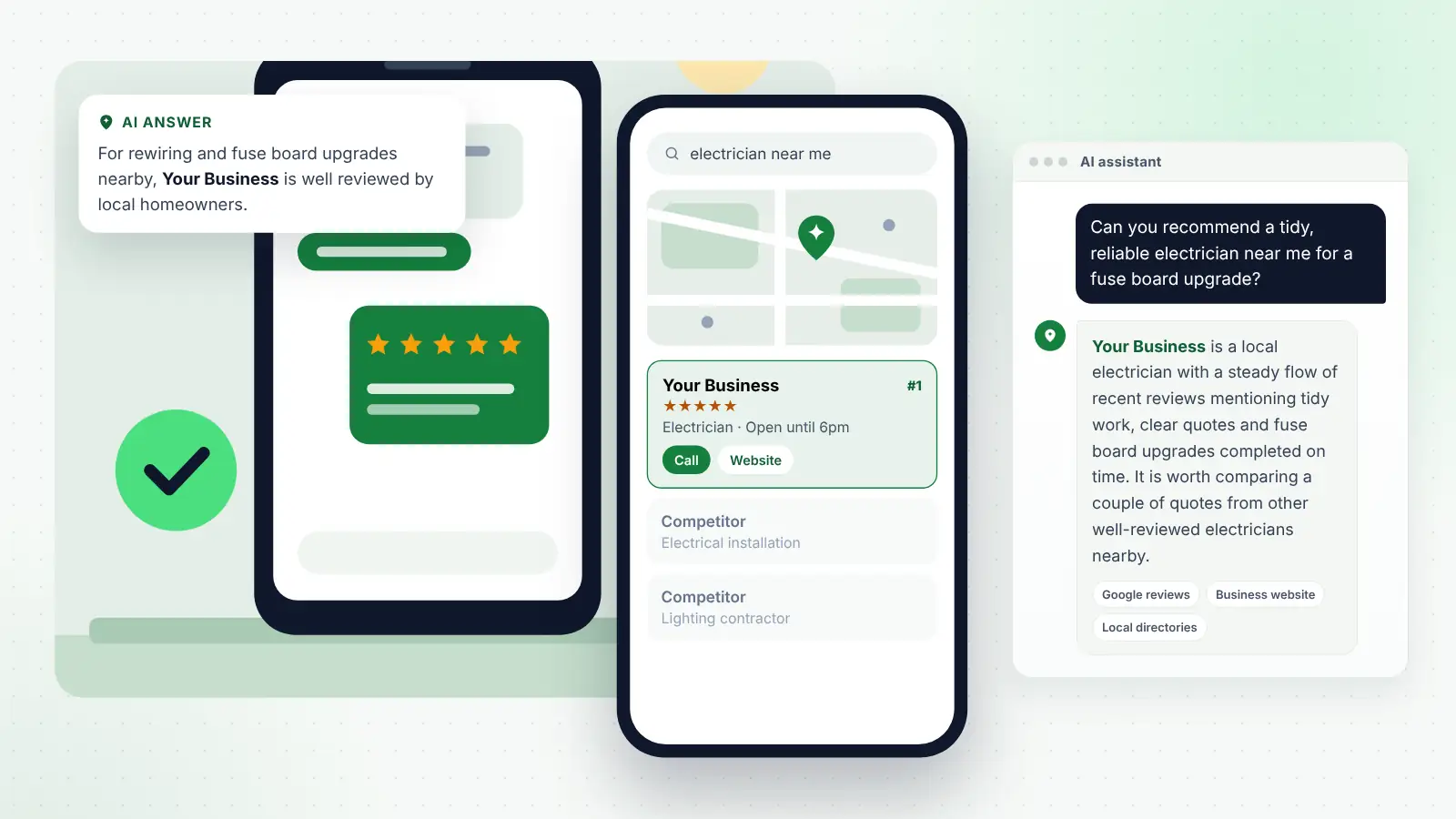
Picture someone searching for an electrician on a Sunday evening. They see three listings with similar ratings. One has recent reviews describing fuse board upgrades, tidy work and clear quotes; the others have older reviews that say “good job” and little else. The request you sent months earlier, naming the job and thanking the customer properly, is part of why the first listing reads as the obvious choice. The same applies to a salon whose reviews describe colour correction, or a practice whose reviews mention a calm reception team.
Reviews are only one part of local visibility, alongside your Business Profile, consistent details, your website and local links. If you would rather have the whole picture handled together, local SEO and AI search services for small businesses can build your review routine into a wider plan.
Review requests and AI assistants
People increasingly ask ChatGPT, Gemini, Copilot, Perplexity and Google’s AI features questions such as “Can you recommend a tidy, reliable electrician near me?” or “Which salon near me is good at blonde highlights?” When these tools answer, they draw on what they can find about local businesses, and customer reviews are one of the sources that describe how a business actually performs.
Short reviews give an assistant very little to say beyond a star rating. Reviews that describe a specific job, a problem solved or how staff behaved give it something concrete to match against a detailed question. That is another reason to write requests that make the customer’s own experience easy to recall, without telling them what to say.
Two cautions. First, nobody outside these companies knows exactly how much weight reviews carry in their answers, and the systems change often, so treat reviews as one useful input rather than a lever. Second, scripted or incentivised reviews tend to sound alike, and repeated phrasing is exactly the kind of pattern review platforms look for when removing content. Genuine variety is both safer and more convincing.
Frequently asked questions
Can I ask customers to mention my town or a specific service in their review?
Not directly. Google’s current policy says businesses should not request that specific content be included in reviews. Make your own message specific instead, for example by thanking the customer for the particular job in their area, and leave the wording of the review entirely to them.
Is it acceptable to ask for a review in the same message as a discount for next time?
It is better not to. Combining them can look like an incentive, which Google prohibits, and adding a promotion can turn a feedback request into a direct marketing message under UK rules. Send any offers separately, and only to customers who have agreed to receive marketing.
Should I send a request to a customer who complained?
If the complaint has been resolved and you ask every customer as a matter of routine, yes, in the same way as everyone else. Leaving them out because you expect a lower rating is selective asking. If the matter is still open, deal with the complaint first.
Can my staff have a target for the number of reviews they collect?
No. Google’s policy now specifically names asking staff to solicit a certain number of reviews as a breach. Make asking part of the normal routine for everyone, and track reviews at business level rather than rewarding individuals.
How often can I ask a regular customer?
Once or twice a year is plenty for regulars such as salon clients or café customers. Asking after every visit becomes irritating and adds little, since a single detailed review is worth more than repeated short ones from the same person.
Do I need consent to text customers a review request?
A plain request for feedback that contains no promotional content is generally treated differently from marketing, but your messages still need to respect data protection rules and how the customer expects you to use their number. Keep requests non-promotional, and check the Information Commissioner’s Office guidance if you are unsure.
Final thoughts
The right words make asking for reviews feel ordinary rather than awkward. Pick the templates that match how you work, adapt them to your own voice, and save them somewhere you can send them in seconds. Ask everyone in the same way, offer nothing in return, name the job but never the words you would like to see, and send one reminder at most. Do that for a few months and you will usually find your reviews become more frequent, more detailed and more useful, both to the customers reading them and to the services that help those customers decide.